YAM Arm Series
YAM (Yet Another Manipulator) is I2RT's flagship robotic arm — a 6-DOF, CAN bus–driven manipulator designed for real-world research and embodied AI data collection. The YAM family spans four tiers to match different reach, payload, and budget requirements.
Model Overview
| Model | Price | Notes | Details |
|---|---|---|---|
| YAM Standard | $2,999 | Standard research arm | Spec & API → |
| YAM Pro | $3,499 | Enhanced actuators, same SDK | Spec & API → |
| YAM Ultra | $4,299 | Top spec components | Spec & API → |
| BIG YAM | $4,999 | Heavier payload; DM6248 shoulders; different gains | Spec & API → |
| YAM Leader | $2,999 | Teaching handle for teleoperation | Spec & API → |
Choosing a variant
SDK-wise, YAM Standard / Pro / Ultra are interchangeable — only the arm_type argument differs. BIG YAM is the only variant with substantially different control gains, since it uses heavier DM6248 motors. See each variant page for the one-line API difference and per-variant config.
Specifications
| Parameter | Value |
|---|---|
| Degrees of Freedom | 6 |
| Communication | CAN bus (1 Mbit/s) |
| Motor Series | DM series brushless |
| Control Modes | Joint position PD · Gravity compensation · Zero-gravity |
| Simulation | MuJoCo (MJCF + URDF provided) |
| Safety | 400 ms motor timeout (configurable) |
| Mounting | Table-top (standard) |
Arm Hardware Variants
| Arm Type | Shoulder Motors | Elbow/Wrist Motors | Gravity Comp Factor (per joint) | Notes |
|---|---|---|---|---|
YAM | 3× DM4340 | 3× DM4310 | [1.0, 1.1, 1.1, 1.2, 1.0, 1.0] | Standard arm |
YAM_PRO | 3× DM4340 | 3× DM4310 | [1.0, 1.1, 1.1, 1.2, 1.0, 1.0] | Enhanced actuators |
YAM_ULTRA | 3× DM4340 | 3× DM4310 | [1.0, 1.1, 1.1, 1.2, 1.0, 1.0] | Top-spec build |
BIG_YAM | 2× DM6248 | 2× DM4340 + 2× DM4310 | [1.0, 1.2, 1.0, 1.1, 1.0, 1.0] | Heavier, reversed joint 2 |
The gravity-compensation factor is a per-joint vector (from i2rt/robots/config/<arm>.yml), not a single scalar.
3D Model
The YAM URDF and MuJoCo XML are included in the repository:
i2rt/robot_models/arm/yam/
├── yam.urdf
├── yam.xml
└── assets/          # STL meshes (visual + collision)
Videos
Hardware Setup
Get a single YAM arm out of the box, wired, powered, and ready to run a demo.
Prerequisite
Finish SW Setup first — Python SDK + CAN environment must be ready.
1. Unbox
- [ ] Take the arm and base plate out of the foam
- [ ] Verify accessories: CANable USB-CAN adapter, power supply, gripper
- [ ] Inspect for shipping damage on the joint covers and cables
2. Mount on a stable surface
- [ ] Bolt the base plate to a workbench (or place on a heavy table)
- [ ] Keep at least 1 m clearance in all directions for the arm's reach
- [ ] Route the CAN + power cables away from the workspace
3. Wire it up
- [ ] Connect the CAN cable between the arm and your CANable adapter
- [ ] Plug the CANable into a USB port on the host computer
- [ ] Connect the 24 V power supply to the arm's power input
4. Power on
- [ ] Flip the supply switch — joints should hum briefly as motors initialize
- [ ] Verify the CAN device shows up:bash
ls -l /sys/class/net/can*
5. Verify
# Bring up CAN if not auto-enabled
sudo ip link set can0 up type can bitrate 1000000

# Quick zero-gravity test — the arm should float
python i2rt/robots/motor_chain_robot.py --channel can0 --gripper linear_4310
Push the arm gently — it should hold position when released.
Quick Start Demo
Run your first YAM arm demo in 5 minutes.
1. Test without hardware (sim mode)
You don't even need an arm. Launch the MuJoCo viewer:
python examples/minimum_gello/minimum_gello.py --mode visualizer_localA 3D window opens showing the YAM model. Use this to verify your install before plugging in hardware.
2. Zero-gravity mode (with hardware)
The arm enters a gravity-compensated floating state — push it freely, it stays where you leave it.
python i2rt/robots/motor_chain_robot.py --channel can0 --gripper linear_4310Press Ctrl+C to exit.
3. Python API — read state and move
from i2rt.robots.get_robot import get_yam_robot
import numpy as np

# Connect (zero-gravity ON by default)
robot = get_yam_robot(channel="can0", zero_gravity_mode=True)

# Read current observations
obs = robot.get_observations()
print("Arm joints:", obs["joint_pos"])   # (6,) radians
print("Gripper:",    obs["gripper_pos"])  # (1,) normalized

# Command home position (6 arm joints + 1 gripper)
robot.command_joint_pos(np.zeros(7))

robot.close()
4. Different arm variants
from i2rt.robots.get_robot import get_yam_robot
from i2rt.robots.utils import ArmType

robot = get_yam_robot(arm_type=ArmType.BIG_YAM, channel="can0")| Arm type | Constant |
|---|---|
| Standard | ArmType.YAM |
| Pro | ArmType.YAM_PRO |
| Ultra | ArmType.YAM_ULTRA |
| Big | ArmType.BIG_YAM |
| Gripper-only | ArmType.NO_ARM |
For the full SDK and advanced examples, see the API Reference section below.
Grippers
YAM supports six interchangeable end-effector options. Specify the gripper when creating the robot:
from i2rt.robots.get_robot import get_yam_robot
from i2rt.robots.utils import GripperType

robot = get_yam_robot(channel="can0", gripper_type=GripperType.LINEAR_4310)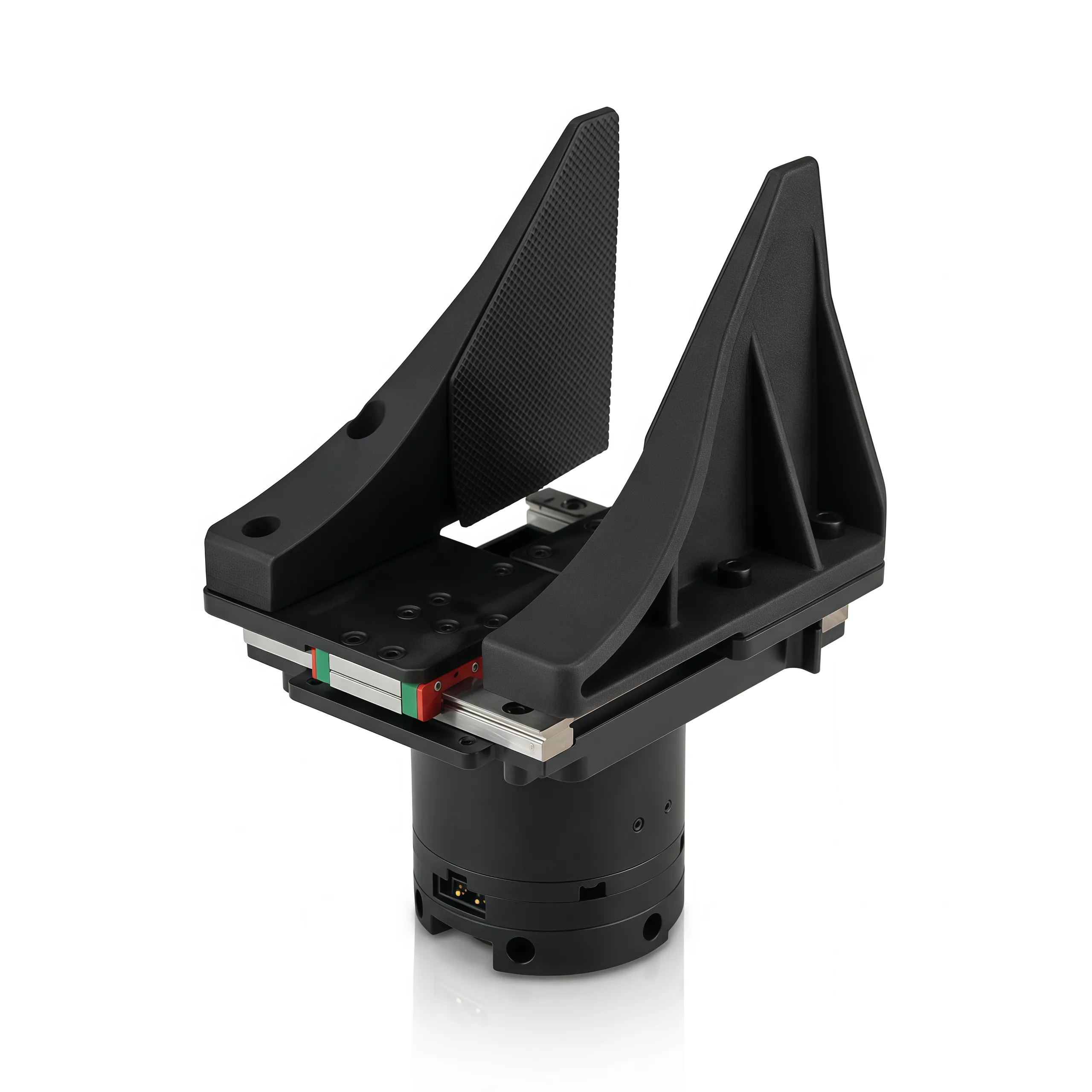
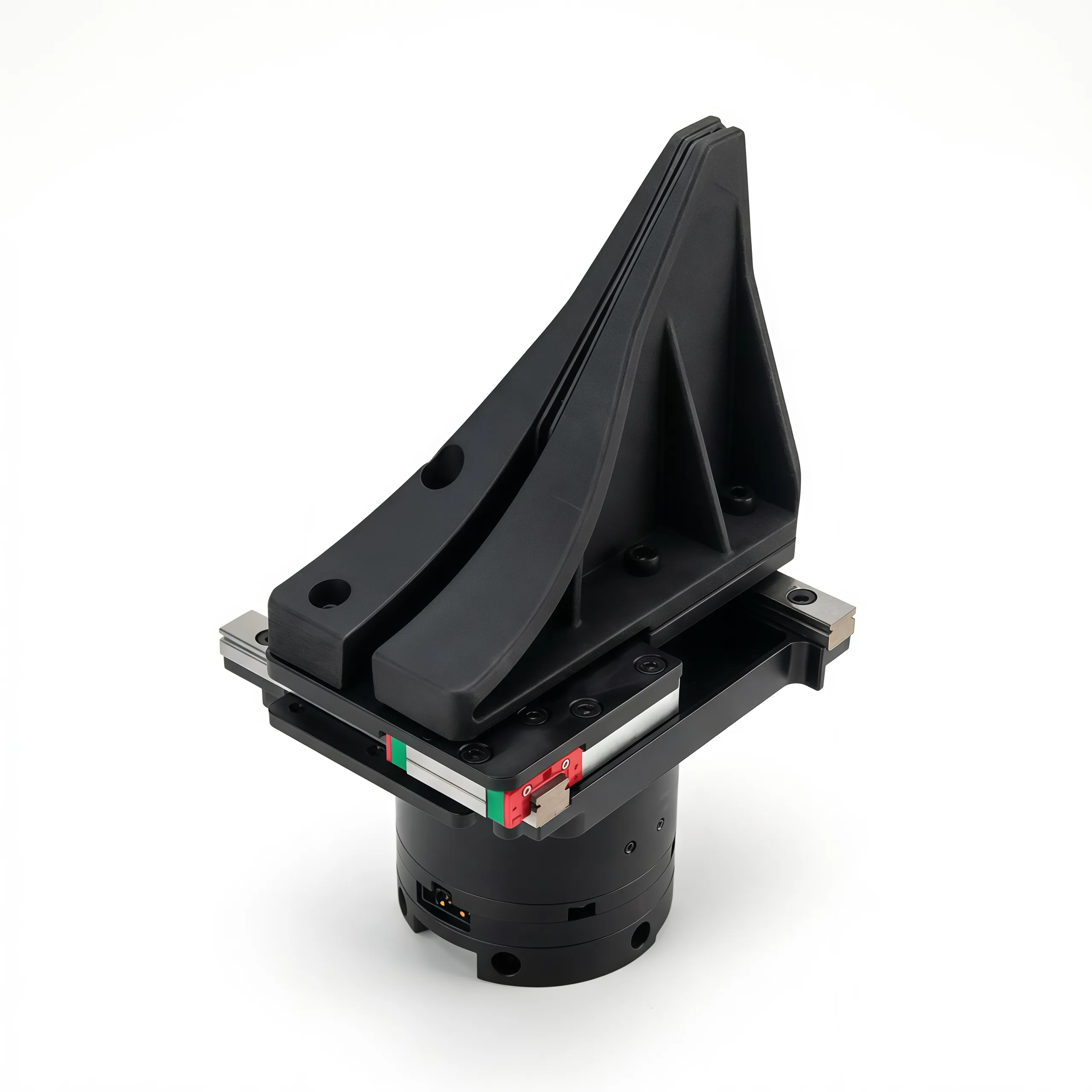
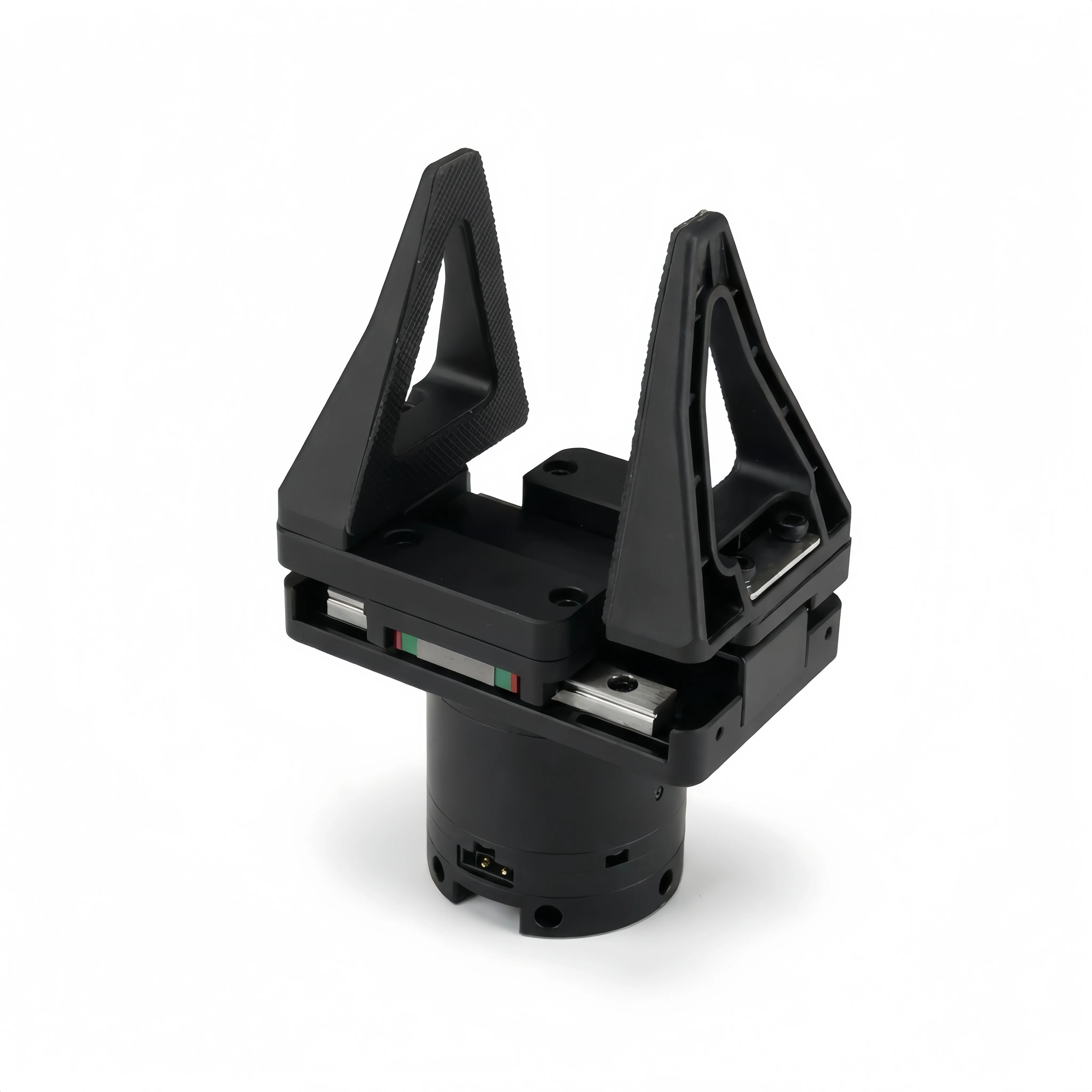
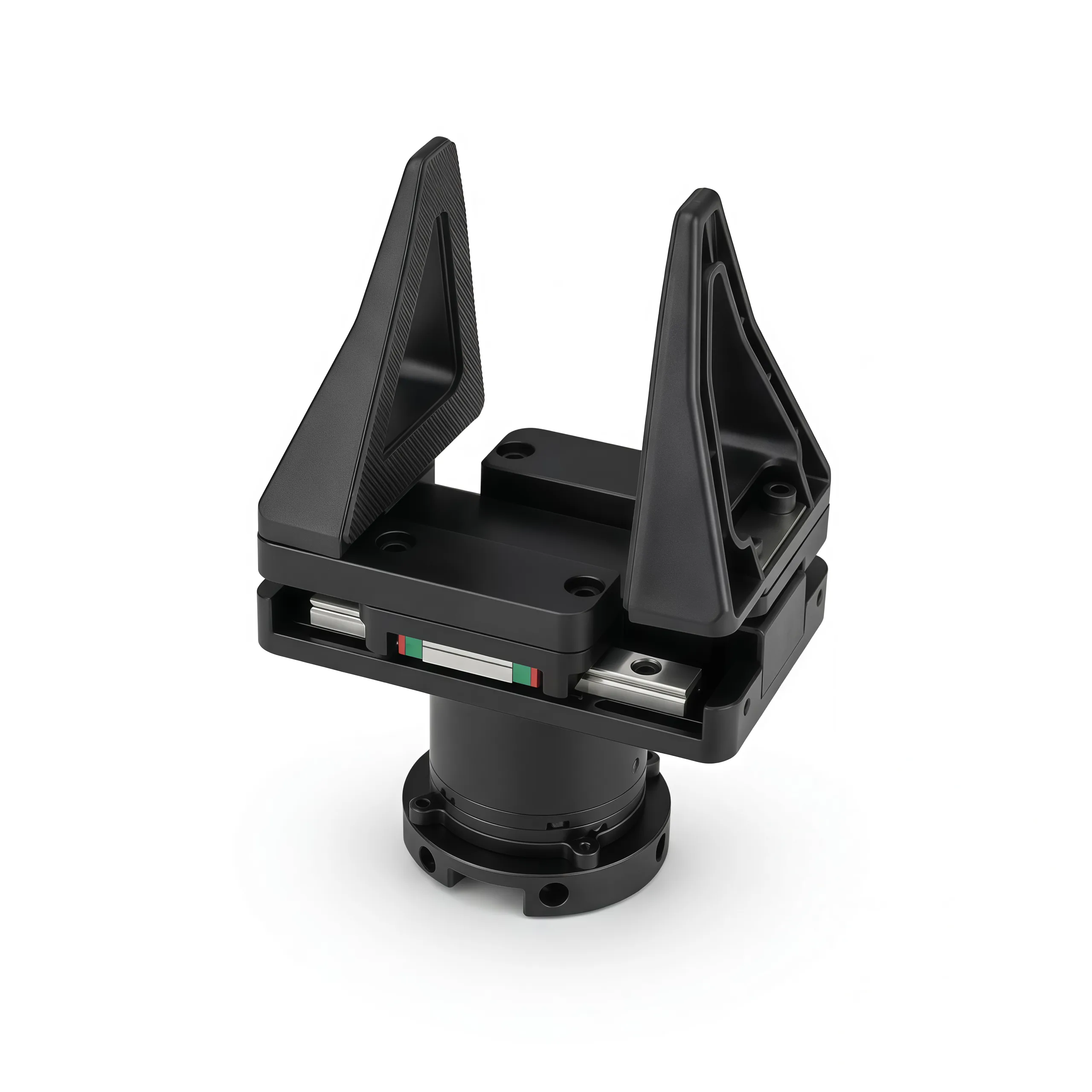
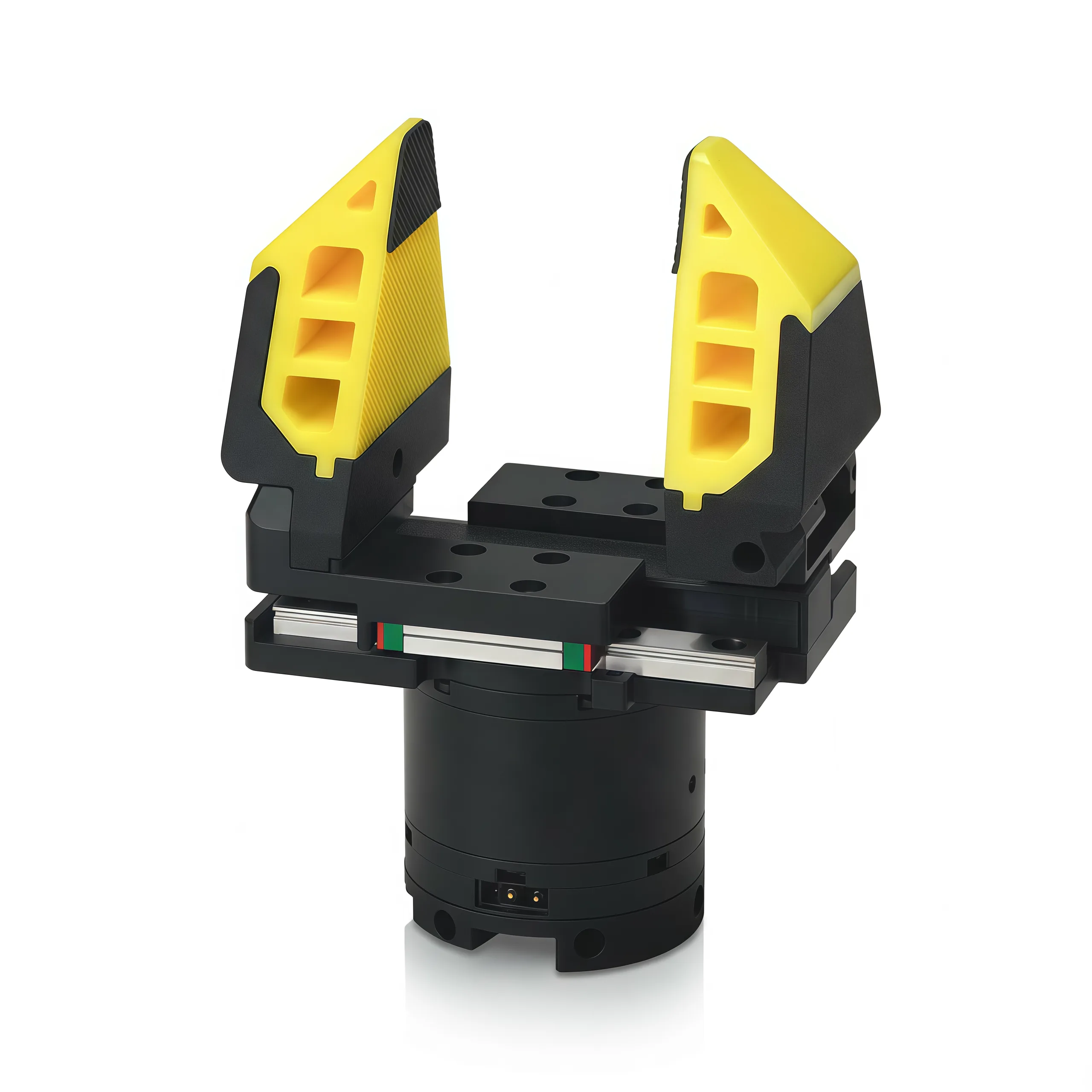
crank_4310
Zero-linkage crank gripper powered by the DM4310 motor. The crank mechanism minimizes the total gripper width — ideal for reaching into tight spaces.
| Property | Value |
|---|---|
| Motor | DM4310 |
| Mechanism | Zero-linkage crank |
| Calibration | Required — auto-detected on startup |
| PD Gains | kp=20, kd=0.5 |
| Best for | Narrow workspace, minimizing sweep width |
linear_3507
Lightweight linear gripper with a DM3507 motor. Smaller and lighter than the 4310 variant.
| Property | Value |
|---|---|
| Motor | DM3507 |
| Mechanism | Linear actuator |
| Calibration | Required — auto-detected on startup |
| PD Gains | kp=10, kd=0.3 |
| Best for | Weight-sensitive setups |
Calibration required
The linear_3507 motor travels more than 2π radians over the full stroke, so the SDK needs to know its start position. On startup it auto-runs a calibration routine that moves the gripper in both directions to detect limits. Ensure the gripper can move freely during init.
linear_4310
Standard linear gripper with the heavier DM4310 motor. Slightly more gripping force than the 3507.
| Property | Value |
|---|---|
| Motor | DM4310 |
| Mechanism | Linear actuator |
| Calibration | Required — same auto-calibration as linear_3507 |
| PD Gains | kp=20, kd=0.5 |
| Best for | General-purpose tasks, higher force |
flexible_4310
Linear gripper with flexible soft fingertips. Identical drivetrain to linear_4310 (DM4310 motor, same stroke), but the compliant tips conform to the workpiece — useful for grasping fragile or irregular objects without precise pose alignment.
| Property | Value |
|---|---|
| Motor | DM4310 |
| Mechanism | Linear actuator with flexible tips |
| Calibration | Required — same auto-calibration as linear_4310 |
| PD Gains | kp=20, kd=0.5 |
| Best for | Fragile or irregular objects, tolerant grasping |
yam_teaching_handle
The leader arm handle — not a manipulation gripper, but a hand controller for teleoperation.
| Feature | Description |
|---|---|
| Trigger | Controls follower gripper open/close |
| Top button | Enable/disable arm synchronization |
| Second button | User-programmable |
For full usage — trigger reading, encoder calibration, and teleoperation setup — see the YAM Leader Arm page.
no_gripper
Arm-only configuration with no end effector. Use when the application doesn't require grasping.
robot = get_yam_robot(gripper_type=GripperType.NO_GRIPPER)
# robot.num_dofs() returns 6 (arm joints only)
Gripper Models (MuJoCo)
i2rt/robot_models/gripper/
├── crank_4310/        crank_4310.xml + assets/
├── linear_3507/       linear_3507.xml + assets/
├── linear_4310/       linear_4310.xml + assets/
├── flexible_4310/     flexible_4310.xml + flexible_4310.urdf + assets/
├── yam_teaching_handle/  yam_teaching_handle.xml
└── no_gripper/        no_gripper.xml
Gripper Force Limiting
The SDK includes automatic gripper force limiting when the gripper is clogged (stalled against an object). This is enabled by default with limit_gripper_force=50.0 N. The system monitors motor effort and speed to detect when the gripper has hit an object, then limits the applied torque accordingly.
API Reference
Import
from i2rt.robots.get_robot import get_yam_robot
from i2rt.robots.utils import ArmType, GripperType
get_yam_robot()
Factory function — the recommended way to create a robot instance.
robot = get_yam_robot(
    channel="can0",
    arm_type=ArmType.YAM,
    gripper_type=GripperType.LINEAR_4310,
    zero_gravity_mode=True,
    ee_mass=None,
    ee_inertia=None,
    sim=False,
)| Parameter | Type | Default | Description |
|---|---|---|---|
channel | str | "can0" | CAN interface name (e.g. can0, can_follower_l). Ignored in sim mode. |
arm_type | ArmType | ArmType.YAM | Arm variant: YAM, YAM_PRO, YAM_ULTRA, BIG_YAM, or NO_ARM (gripper-only) |
gripper_type | GripperType | GripperType.LINEAR_4310 | Gripper type. See Grippers |
zero_gravity_mode | bool | True | Enable gravity compensation on init |
ee_mass | float | None | None | End-effector mass override (kg) for MuJoCo inertial |
ee_inertia | np.ndarray | None | None | End-effector inertia override — 10-element array [ipos(3), quat(4), diaginertia(3)] |
gravity_comp_factor | np.ndarray | None | None | Per-joint gravity-compensation factor (6 elements). Overrides the arm-type default. |
gripper_limits_override | np.ndarray | None | None | [closed, open] limits in radians. When set, the gripper skips auto-calibration. |
gripper_kp | float | None | None | Override the gripper's default kp (per-call). |
gripper_kd | float | None | None | Override the gripper's default kd (per-call). |
sim | bool | False | If True, return a SimRobot (no hardware needed) |
Returns: MotorChainRobot instance (or SimRobot when sim=True).
Arm types
Since v1.0, all arm variants use the same factory function. Pass arm_type=ArmType.BIG_YAM instead of the removed get_big_yam_robot(). Pass arm_type=ArmType.NO_ARM for gripper-only setups.
Zero-gravity vs PD mode
With zero_gravity_mode=True the arm floats — great for teleoperation. With False, the arm holds its current joint positions as PD targets. Use False when operating without the motor safety timeout.
MotorChainRobot
num_dofs() → int
Returns the number of controllable degrees of freedom (arm joints + gripper if present).
n = robot.num_dofs()
# 7 (6 arm joints + 1 gripper), or 6 if no gripper
get_joint_pos() → np.ndarray
Returns the current joint positions as a NumPy array in radians. Includes all DOFs (arm + gripper).
q = robot.get_joint_pos()
# shape: (7,) for 6-joint arm + gripper
# shape: (6,) for arm-only (no_gripper)
command_joint_pos(joint_pos: np.ndarray) → None
Commands all joints to move to joint_pos (radians). The controller uses PD tracking. For robots with a gripper, the last element controls the gripper position (normalized 0–1 for linear grippers).
import numpy as np
robot.command_joint_pos(np.zeros(7))  # move arm to home, close gripper
Joint limits
Joint limits are defined in the MuJoCo XML model (e.g. i2rt/robot_models/arm/yam/yam.xml). A 0.15 rad safety buffer is applied automatically. Exceeding limits can cause motor errors.
command_joint_state(joint_state: dict) → None
Commands joints with position, velocity, and optional PD gains.
robot.command_joint_state({
    "pos": target_positions,    # np.ndarray
    "vel": target_velocities,   # np.ndarray
    "kp": custom_kp,            # optional, overrides defaults
    "kd": custom_kd,            # optional, overrides defaults
})
get_observations() → dict
Returns a dictionary of all robot observations. This is the primary method for reading robot state.
obs = robot.get_observations()
# Without gripper:
#   obs["joint_pos"]  — (6,) joint positions
#   obs["joint_vel"]  — (6,) joint velocities
#   obs["joint_eff"]  — (6,) joint efforts (torques)
#
# With gripper:
#   obs["joint_pos"]  — (6,) arm joint positions only
#   obs["joint_vel"]  — (6,) arm joint velocities
#   obs["joint_eff"]  — (6,) arm joint efforts
#   obs["gripper_pos"] — (1,) gripper position
#   obs["gripper_vel"] — (1,) gripper velocity
#   obs["gripper_eff"] — (1,) gripper effort
#
# With temp_record_flag=True:
#   obs["temp_mos"]   — (N,) MOS temperature per motor (°C)
#   obs["temp_rotor"] — (N,) rotor temperature per motor (°C)
Temperature fields are only included when the underlying MotorChainRobot is constructed with temp_record_flag=True. This is a MotorChainRobot constructor argument (default False) — it is not exposed through the get_yam_robot() factory, so reach for it only when instantiating MotorChainRobot directly.
get_robot_info() → dict
Returns robot configuration — useful for programmatic introspection (used internally by the Viser and MuJoCo control interfaces).
info = robot.get_robot_info()
# {
#   "arm_type":           ArmType,
#   "gripper_type":       GripperType,
#   "kp":                 np.ndarray,
#   "kd":                 np.ndarray,
#   "grav_comp_kd":       np.ndarray,
#   "coulomb_friction":   np.ndarray,
#   "joint_limits":       np.ndarray,   # shape (N, 2) — one [lower, upper] row per joint
#   "gripper_limits":     np.ndarray,
#   "gravity_comp_factor":np.ndarray,
#   "gripper_index":      int | None,
#   "limit_gripper_effort": float,
#   "use_coulomb_friction": bool,
#   "enable_auto_recovery": bool,
# }
get_motor_torques() → np.ndarray | None
Returns the last computed motor torques (gravity compensation + PD command torques) sent to hardware. Returns None before the first control loop iteration.
torques = robot.get_motor_torques() # (N,) Nmmove_joints(target, time_interval_s=2.0) → None
Smoothly interpolates from the current position to target over time_interval_s seconds (blocking).
robot.move_joints(np.zeros(7), time_interval_s=3.0)zero_torque_mode() → None
Enters zero-torque mode — all PD gains are set to zero, motors produce no active torque.
update_kp_kd(kp, kd) → None
Update the PD gains at runtime.
robot.update_kp_kd(kp=new_kp_array, kd=new_kd_array)enter_gravity_comp_idle() → None
Reset the command buffer to zeros with kd = grav_comp_kd (from the arm's YAML), returning the arm to gravity-comp idle. self._kp and self._kd are left untouched, so a later command_joint_pos keeps its tracking gains.
robot.command_joint_pos(target)
# ... do work ...
robot.enter_gravity_comp_idle()  # arm floats again, with motor-side idle damping
The MuJoCo viewer calls this automatically on every CONTROL → VIS toggle. See Gravity & Friction Compensation for details.
start_recording(save_dir: str) → bool
Starts asynchronous joint state recording to disk. Requires the robot to have been constructed with a joint_state_saver_factory. Raises RuntimeError if no saver factory was provided.
robot.start_recording("/tmp/session_001")stop_recording(prefix: str = "") → tuple[bool, str]
Stops an active recording and returns (success, message).
ok, msg = robot.stop_recording(prefix="take_1")close() → None
Safely shuts down the robot: stops the control thread and closes the CAN interface.
robot.close()Command-line: Zero-gravity test
# Arm enters gravity-compensated floating mode
python i2rt/robots/motor_chain_robot.py --channel can0 --gripper linear_4310

# Test with BIG YAM
python i2rt/robots/motor_chain_robot.py --arm big_yam --channel can0

# Simulation mode (no hardware needed)
python examples/minimum_gello/minimum_gello.py --sim
Motor Configuration Utilities
# Disable the 400 ms safety timeout (run twice)
python i2rt/motor_config_tool/set_timeout.py --channel can0
python i2rt/motor_config_tool/set_timeout.py --channel can0

# Re-enable
python i2rt/motor_config_tool/set_timeout.py --channel can0 --timeout

# Zero motor ID 1 (run for each motor 1–6 as needed)
python i2rt/motor_config_tool/set_zero.py --channel can0 --motor_id 1
MuJoCo Models
The SDK uses MuJoCo for gravity computation, simulation, and visualization. Arm and gripper models are combined at runtime via combine_arm_and_gripper_xml().
i2rt/robot_models/
├── arm/
│   ├── yam/yam.xml
│   ├── yam_pro/yam_pro.xml
│   ├── yam_ultra/yam_ultra.xml
│   └── big_yam/big_yam.xml
└── gripper/
    ├── crank_4310/crank_4310.xml
    ├── linear_3507/linear_3507.xml
    ├── linear_4310/linear_4310.xml
    ├── flexible_4310/flexible_4310.xml
    ├── yam_teaching_handle/yam_teaching_handle.xml
    └── no_gripper/no_gripper.xml
Launch the visualizer without hardware:
python examples/minimum_gello/minimum_gello.py --mode visualizer_localPer-Arm YAML Configuration
Hardware tuning lives in i2rt/robots/config/<arm>.yml — one file per arm variant.
| Field | Type | Purpose |
|---|---|---|
kp / kd | 6-element list | Per-joint PD gains used by command_joint_pos / command_joint_state. |
gravity_comp_factor | 6-element list | Per-joint multiplier on the model gravity torque. Overridable via get_yam_robot(gravity_comp_factor=...). |
grav_comp_kd | 6-element list | Motor-side MIT-mode kd applied only in gravity-comp idle. Tunes how stiff the arm feels when released. YAML-only. |
coulomb_friction | 6-element list, Nm | Magnitude of friction · sign(q_dot) injected alongside gravity comp. Cancels static stiction. YAML-only. |
The gripper slot is automatically padded with 0.0 for grav_comp_kd and coulomb_friction — gripper joints don't need passive compensation.
See Gravity & Friction Compensation below for the full physics and tuning workflow.
Gravity & Friction Compensation
YAM arms compute gravity torques from their MuJoCo model and add them to every motor command, so the arm "floats" against gravity. From v1.1.1 the same control law also includes per-joint Coulomb friction compensation and per-joint motor-side idle damping (grav_comp_kd). Together they make the arm easy to backdrive while keeping idle behaviour stable.
How the torque command is built
In gravity-comp idle (zero_gravity_mode=True, no active control command), each motor receives:
τ = g(q) · gravity_comp_factor + coulomb_friction · sign(q_dot)plus motor-side MIT-mode kd damping equal to grav_comp_kd[i] running at kHz on the motor's onboard loop.
Under an active PD command (command_joint_pos / command_joint_state):
τ = τ_PD + g(q) · gravity_comp_factor + coulomb_friction · sign(q_dot)grav_comp_kd is not applied during PD control — self._kd is used instead, so PD tracking gains are unchanged. The relevant code lives in i2rt/robots/motor_chain_robot.py.
YAML defaults
gravity_comp_factor: [1.0, 1.1, 1.1, 1.2, 1.0, 1.0]
grav_comp_kd:        [0.1, 0.1, 0.1, 0.3, 0.05, 0.05]
coulomb_friction:    [0.3, 0.3, 0.3, 0.06, 0.06, 0.06]
Per-arm defaults
yam_pro.yml, yam_ultra.yml, and big_yam.yml ship sensible starting values, but the wrist joints in particular vary with payload — expect to retune grav_comp_kd[3] (J4) and coulomb_friction[3] on a custom build.
Runtime override
Only gravity_comp_factor can be overridden per-call:
import numpy as np
from i2rt.robots.get_robot import get_yam_robot

robot = get_yam_robot(
    channel="can0",
    gravity_comp_factor=np.array([1.0, 1.15, 1.10, 1.25, 1.0, 1.0]),
)
grav_comp_kd and coulomb_friction are YAML-only — they're hardware-tuning constants tied to the specific arm build.
Mode transitions: enter_gravity_comp_idle()
After issuing PD commands you can return the arm to a clean gravity-comp idle:
robot.command_joint_pos(target)   # active PD
# ... do work ...
robot.enter_gravity_comp_idle()   # back to floating, with grav_comp_kd damping
Why this matters
Before v1.1.1 the viewer used update_kp_kd(zeros, zeros) on toggle. That only rewrote member caches and left the stale PD target in _commands, so motors kept holding the last CONTROL pose — felt as per-joint friction after returning to VIS. If you call update_kp_kd directly, follow it with enter_gravity_comp_idle() to clear the stale target.
Simulation parity
SimRobot runs a daemon physics thread that applies model-based gravity comp at the same schedule as hardware. The MuJoCo viewer toggles it via:
robot.enable_gravity_comp()    # VIS mode
robot.disable_gravity_comp()   # CONTROL mode (teleport on; physics paused)
get_yam_robot(sim=True) passes a unit factor (np.ones(...)) so sim uses the unscaled MuJoCo gravity. coulomb_friction and grav_comp_kd flow through but have no observable effect in sim (the MuJoCo model has no Coulomb friction and no MIT-mode motor model).
Tuning workflow
Start from the per-arm defaults and adjust in this order:
- Set
gravity_comp_factor. Lift the arm to a horizontal pose and release. Increasegravity_comp_factor[i]on whichever joint sags first; decrease on whichever drifts up. Tune one joint at a time, shoulder-to-wrist. - Set
coulomb_friction. Once the arm holds pose, give each joint a small push. If a joint resists at first then "snaps free", raise itscoulomb_frictionslightly. Stop just before joints start drifting on their own. - Set
grav_comp_kdonly if needed. If a joint chatters or limit-cycles after release, raise itsgrav_comp_kd. Most joints don't need it (defaults near 0.05–0.1).
Quick test loop
# Headless: brings the arm up in grav-comp idle (add --log for live joint/torque table)
python i2rt/robots/motor_chain_robot.py --arm yam --gripper linear_4310 --channel can0

# Browser viewer (Viser) — mirror, IK drag, per-joint sliders
python examples/control_with_viser/control_with_viser.py --arm yam --gripper linear_4310 --channel can0

# MuJoCo viewer — VIS/CONTROL toggle, auto-calls enter_gravity_comp_idle() on toggle
python examples/control_with_mujoco/control_with_mujoco.py --arm yam --gripper linear_4310 --channel can0
Edit the YAML, re-run, repeat. No code changes needed.
Troubleshooting
| Symptom | Likely cause | Fix |
|---|---|---|
| Joint sags slowly under gravity | gravity_comp_factor too low | Raise the per-joint factor by 0.05–0.10 increments |
| Joint drifts up against gravity | gravity_comp_factor too high | Lower the per-joint factor |
| Joint chatters / limit-cycles when released | Stiction interacting with under-compensation; or grav_comp_kd too low | First, recheck gravity_comp_factor; if clean, raise grav_comp_kd |
| Joint feels "sticky" — needs a push to start, then moves freely | coulomb_friction too low | Raise the per-joint friction value |
| Joint walks on its own after release | coulomb_friction too high | Lower the per-joint friction value |
| Arm "holds" the previous PD target after CONTROL → VIS | enter_gravity_comp_idle() was not called | Use the v1.1.1 viewer (auto-calls), or call it yourself after command_joint_pos |
| Sim arm flops to the floor | enable_gravity_comp() was not called or start_server() not invoked | Use mujoco_control_interface (calls both for you) |
MuJoCo Control Interface
Location: examples/control_with_mujoco/
Interactive MuJoCo viewer for i2rt robots. Visualises the robot in real time and lets you move it by dragging a target marker via inverse kinematics — no hardware required in simulation mode.
The sliders/mocap → IK → self-collision → command_joint_pos pipeline runs on a daemon control thread at the --dt loop timestep (default 0.02 s ≈ 50 Hz), guarded by short viewer.lock() sections so viewer rendering never stalls commands. Commands that would self-collide are blocked.
Modes
The interface has two modes toggled with SPACE:
VIS mode (default):
  Robot joint states  ──►  MuJoCo viewer
  (real hw: gravity comp idle    sim: physics thread on, grav-comp active)

CONTROL mode (press SPACE):
  Drag target marker  ──►  IK solver  ──►  Command arm
  (real hw: PD tracks target      sim: physics paused; arm teleports)
In --sim, SPACE additionally calls SimRobot.enable_gravity_comp() / disable_gravity_comp() so the simulated arm settles under gravity in VIS and follows the IK target instantly in CONTROL — matching the hardware feel.
Running
# Simulation (no hardware)
python examples/control_with_mujoco/control_with_mujoco.py --sim
python examples/control_with_mujoco/control_with_mujoco.py --arm big_yam --sim
python examples/control_with_mujoco/control_with_mujoco.py --arm no_arm --gripper flexible_4310 --sim

# Real hardware
python examples/control_with_mujoco/control_with_mujoco.py --channel can0
python examples/control_with_mujoco/control_with_mujoco.py --arm big_yam --channel can0
Arguments
| Argument | Default | Description |
|---|---|---|
--arm | yam | Arm type: yam, yam_pro, yam_ultra, big_yam, no_arm |
--gripper | linear_4310 | Gripper type |
--channel | can0 | CAN interface name (real hardware only) |
--sim | off | Use simulation instead of real hardware |
--dt | 0.02 | Control loop timestep |
--site | auto | MuJoCo site name as end-effector |
--log | off | Log joint state and torques each loop iteration |
Viewer Controls
- Press SPACE to enter CONTROL mode (marker turns red)
- Double-click the red target sphere to select it
- Ctrl + right-drag — translate the target
- Ctrl + left-drag — rotate the target
- Press SPACE again to return to VIS mode
Viser Control Interface
Location: examples/control_with_viser/
Browser-based 3-D viewer and teleop interface, powered by viser. Open the viewer in any browser — no native viewer required, no display attached to the robot.
The interface starts in read-only mode. The robot accepts no commands until the operator visually confirms alignment and clicks Enable Robot. Once enabled, three control modes are available:
VIS mode (default):
  Robot joint states  ──►  Browser viewer  (read-only mirror)

IK mode:
  Drag transform gizmo  ──►  mink IK solver  ──►  Command arm

Joint-slider mode:
  Per-joint sliders (deg)  ──►  Command arm directly
A gripper slider (normalised 0–1) is always available, independent of the arm mode.
Running
# Simulation
python examples/control_with_viser/control_with_viser.py --sim
python examples/control_with_viser/control_with_viser.py --arm big_yam --gripper flexible_4310 --sim

# Custom port (multiple instances on one machine)
python examples/control_with_viser/control_with_viser.py --sim --port 8090

# Real hardware
python examples/control_with_viser/control_with_viser.py --channel can0
Open http://localhost:8080 (or whichever --port you chose) in your browser.
Enabling the Robot
- Open the viewer URL printed on launch.
- Verify the rendered pose matches the physical robot.
- Tick Alignment Confirmed.
- Click Enable Robot.
The robot only starts responding to slider / IK input after step 4.
Teaching-Handle Indicators
When running with --gripper yam_teaching_handle, two on-screen LEDs mirror the leader-arm buttons:
- SYNC — top button, latches arm-sync on/off.
- RECORD — second button, user-programmable (commonly bound to recording).
MuJoCo vs Viser
| Feature | MuJoCo | Viser |
|---|---|---|
| Display | Native window | Browser (any client) |
| Multi-user | Local only | Multiple browsers can connect to one server |
| IK target | Drag in 3-D scene | Drag transform gizmo |
| Per-joint sliders | Yes (CONTROL mode) | Yes (Joint-slider mode) |
| Safety gate | None | Read-only until "Enable Robot" |
| Best for | Local debugging | Remote / headless robot, browser-only setups |
Record & Replay Trajectory
Location: examples/record_replay_trajectory/
Record a manipulation trajectory through teleoperation (or gravity-comp hand-guiding) and replay it exactly — useful for dataset collection and validating robot configurations.
Record phase:
  Arm in gravity-comp mode  ──►  Guide by hand  ──►  Save joint trajectory

Replay phase:
  Load trajectory  ──►  Command arm via PD control  ──►  Arm replays motion
Running
python examples/record_replay_trajectory/record_replay_trajectory.py --channel can0 --gripper linear_4310| Key | Action |
|---|---|
r | Start / stop recording |
p | Play back recorded motion |
s | Save trajectory to file |
l | Load trajectory from file |
q | Quit |
Options:
--channel can0          # CAN bus channel
--gripper linear_4310   # Gripper type (for gravity compensation)
--output file.npy       # Output filename
--load file.npy         # Load and replay a trajectory at startup
Output Format
Trajectories are saved as a NumPy pickled dictionary (not a plain array):
import numpy as np

data = np.load("trajectory.npy", allow_pickle=True).item()

trajectory = data["trajectory"]   # np.ndarray, shape (T, 7) — T timesteps × joints
timestamps = data["timestamps"]   # np.ndarray, shape (T,)   — seconds since epoch
frequency  = data["frequency"]    # float — target control frequency in Hz
allow_pickle=True required
The file is saved with np.save(path, dict) which uses Python pickling. Loading with plain np.load() will raise a ValueError. Always pass allow_pickle=True and call .item() to extract the dict.
Where to Buy
Visit i2rt.com or contact sales@i2rt.com.